
Smart Outreach
Automate customer communication through AI-powered voice calls, emails, and WhatsApp messages.

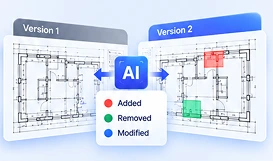
StrategicERP DXF Viewer gives engineering, site and procurement teams a browser-based way to inspect supported 2D CAD drawings without relying on every user having a dedicated CAD workstation. Teams can navigate drawings, measure selected dimensions and share visual comments to support faster coordination between the office and site. File compatibility and available tools depend on the supported formats and configuration.
Precision AI tools engineered for enterprise performance.
Open supported DXF files directly in a web workflow, helping teams review drawings across locations.
Inspect drawing details, move across large plans and isolate relevant layers where supported.
Use point-to-point, area and clearance measurements with the drawing scale configured appropriately.
Show or hide available drawing layers to focus on specific elements during review.
Add visual redlines and comments so reviewers can communicate drawing observations clearly.
Streamlined from upload to alignment.
Upload or select a supported CAD file in the viewer.
Navigate the drawing, review layers and take measurements using the configured scale.
Add comments or redlines and share the review context with relevant stakeholders.
Enable drawing review without installing full CAD software for every reviewer.
Keep engineering, procurement and site teams aligned around the same drawing context.
Use visual markups and measurements instead of relying only on lengthy email explanations.
Help teams review drawings across offices, projects and site locations.
An online DXF viewer lets users open and inspect supported DXF CAD drawings through a web browser rather than a locally installed CAD application.
DWG support depends on the formats enabled in the StrategicERP deployment. Confirm supported file types with the product team before publishing compatibility claims.
The viewer supports measurement workflows such as point-to-point, area and clearance measurement when the drawing scale is correctly configured.
Yes. Cloud-based redlines and visual comments can help teams communicate observations and review changes in context.

StrategicERP from ITAakash Strategic Software (P) Ltd is a software platform for start-to-end process automation and information management systems customized for the Real Estate, Construction & Infrastructure industries. The product owes to its cutting-edge core technology development team, from IIT.
ITAakash Strategic Soft. (P) LTD, 5th floor, D S Business Galleria, Near Huma Adlabs, Beside Toyo House, L.B.S. Road, Kanjur Marg (W), Mumbai, 400078 INDIA.